Find the match on your own channels.
Spectati reads the week's match schedule against your IPTV guide, shows which of your channels carry each game, live and coming up, and plays the best feed in one press.


- Your IPTV source and guide
- Live and coming up
- Kickoff reminders
- Watch from Kickoff
- Matchday Multiview
- Apple TV, iPhone, iPad and Mac
A schedule, read against your guide.
spectati.com publishes the week’s fixtures. Your guide says what each of your channels is showing. The app joins the two on your device.
Follow what you watch
Pick leagues and teams in Settings ▸ Sports, or while your first IPTV source syncs. Following a team doesn’t follow its whole league.
Matched in your guide
A listing counts when it names both teams, or the competition at the time of the game. Channels your provider names after a single game count too. Replays, highlights, studio shows and timeshift channels never do.
Best feed first
Feeds rank by how sure the match is, then a channel in your language, then the order of your sources, then picture quality. Channels you hid are never offered.
Every channel showing it. Best feed first.
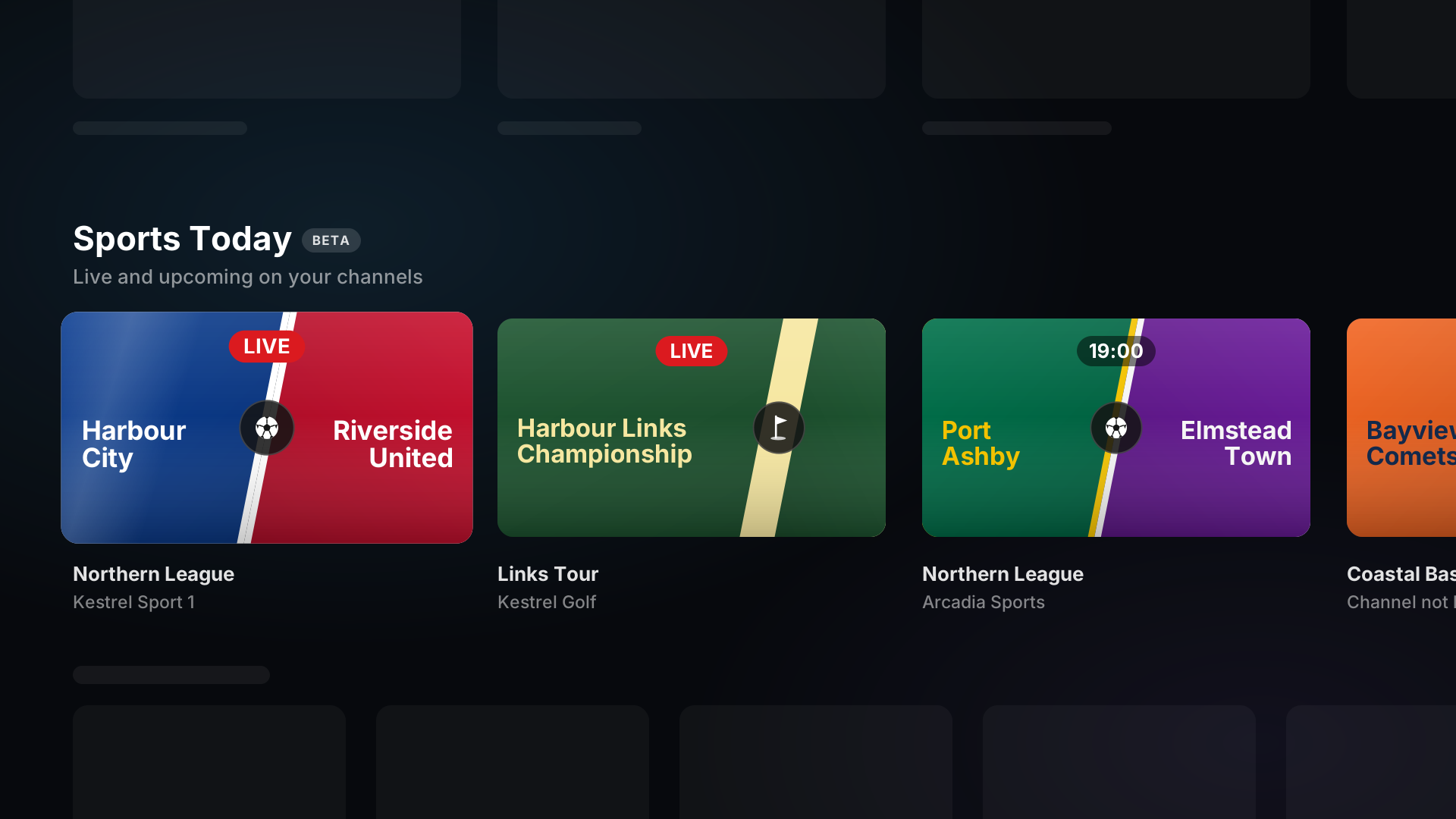
A live match on the Home row plays as soon as you press it. Anything else opens the match, with every feed, a reminder and the ways to catch up.
- Every channel carrying the match, with its source and quality
- A weaker match is labelled Possible match and listed below the rest
- Watch from Kickoff plays the catch-up recording from two minutes before kickoff, where your provider records the channel, and says when it records in lower quality
- Tournaments, Grands Prix and fight cards get Start Over, from the start of the airing on now
- A match beyond the end of your guide shows its kickoff, and its channel once the guide reaches it
Harbour City– Riverside United
Northern League · Matchday 8
Saturday 18 October, 15:00
Harbour Park
- FHDKestrel Sport 1Home IPTV
- HDArcadia SportsHome IPTV
- HDNorthern TV 2Possible match · Travel IPTV
Bayview Comets – Summit Falcons kicks off in 5 minutes on Arcadia Sports
Bayview Comets – Summit Falcons kicks off in 5 minutes on Arcadia Sports
Five minutes before kickoff. On every screen.
Set a reminder on any match, or let Spectati remind you of every game your teams play. iPhone, iPad and Mac get a notification with a Watch button. On every device, Apple TV included, a prompt appears in the app, over whatever is playing.
- Remind me for followed teams covers every game of every team you follow
- Watch plays the best feed, or opens the match when no channel lists it yet
- In the app, the prompt also offers Add to Multiview where Multiview runs
- A tournament that runs for days reminds you once, as it starts
- Postponed and cancelled matches remind nobody
Built around the match
The schedule, the multiview and the Top Shelf all start from the same thing: which of your channels has the game.
The week ahead
Today and the next seven days, grouped by league. It opens on the match that is live, or the next to start.
Matchday Multiview
When matches of one league overlap, open them together, each on its best feed and your teams first. On iPad, Mac and Apple TV.
Top Shelf
On Apple TV, Sports Today sits on the Top Shelf, so a live match is one click from the Home Screen.
No scores
Cards say when a match starts, that it is live, or that it has ended. A match you start late stays unspoiled.
Kit colours
Each match is drawn in the two teams’ home colours, with their names lettered on the shirts.
Events too
Tournaments, Grands Prix and fight cards appear by their title. Follow the tour or series they belong to.
One switch
Hide Sports turns off the row, the schedule, reminders and every schedule download. Settings ▸ Sports turns it back on.
Every platform
Sports Today, the schedule and the in-app prompt work on Apple TV, iPhone, iPad and Mac.
59 competitions. 12 sports.
Leagues, cups, tours and series, with matches and events from yesterday to a week ahead. Every feed comes from your own IPTV service; Spectati supplies no channels or streams.
- Football
- American Football
- Basketball
- Baseball
- Ice Hockey
- Handball
- Rugby Union
- Cricket
- Golf
- Tennis
- Motorsport
- MMA
Free to use. Pay only for full quality.
Pick your leagues and teams for free. A subscription finds the match on your channels.
Free
No account neededInstall it and press play. There is no trial clock and no card.
- Follow leagues and teams
- Sports Today on Home, each card locked
- Every channel in Live TV and the guide
- One switch that turns Sports off
Full quality
OptionalOr $2.99/month, or $99.99 once and never again
- Every channel showing a match, best feed first
- The week’s schedule and each match’s details
- Kickoff reminders, one tap or for every game your teams play
- Watch from Kickoff and Start Over through catch-up
- Matchday Multiview on iPad, Mac and Apple TV
- Sports Today on the Apple TV Top Shelf
- Everything else a subscription adds, from HDR to downloads
Bought inside the app, whenever you decide you want it. Apple handles it via In-App Purchase, with Family Sharing. Both subscriptions start with a 7-day free trial. Manage or cancel anytime from your Apple ID.
- Unlimited devices
- All providers
- tvOS, iOS, iPadOS and macOS
- Family Sharing
- Cancel anytime
Sports questions, answered.
Something we did not cover? Get in touch.
What do I need for Sports in Spectati?
Spectati 1.9 or later and an IPTV source. Spectati finds matches in the source’s XMLTV guide, and in channels your provider names after a single game. Plex, Jellyfin and Emby channels are not searched.
Does Spectati provide sports streams or channels?
No. Spectati shows where a match is on the channels you already have and plays it from your own IPTV service. It supplies no channels, streams, playlists or accounts.
Which sports does the schedule cover?
Football, American Football, Basketball, Baseball, Ice Hockey, Handball, Rugby Union, Cricket, Golf, Tennis, Motorsport and MMA: 59 competitions in all, from domestic leagues to international tournaments, tours and series.
Why does a match say "Channel not listed yet"?
Your guide doesn’t reach it yet, or no listing names it. A match beyond the end of your guide shows its kickoff and a reminder, and its channel appears once the guide lists it.
Does Sports show scores?
No. Cards and reminders say when a match starts, that it is live, or that it has ended, and nothing more.
Is Sports free?
Following leagues and teams is free, and free accounts see the Sports Today row with each card locked. Opening a match, the schedule, reminders, Watch from Kickoff, Matchday Multiview and the Top Shelf need a subscription. Live TV plays every channel on the free tier.
What does Sports send to spectati.com?
Requests for the schedule files of the leagues you follow, or the leagues suggested for your App Store country while you follow none. They carry no account, device or analytics identifier. Turning Sports off in Settings ▸ Sports stops them.
Why is Sports in beta?
Guides name matches in many ways and many languages, and some listings are still missed or matched to the wrong game. Weaker matches are labelled Possible match.
Follow your teams. Spectati finds the channel.
Spectati is free on Apple TV, iPhone, iPad and Mac. Add your IPTV playlist with its guide, follow a few teams, and their next match is on Home.
Also on Apple TV, iPad and Mac
Requires tvOS, iOS, iPadOS or macOS 26